A remote Mac is useful when the work depends on a macOS environment you want to keep in one place: a repository, development tools, local services and a desktop for checking the result. For Claude Code, the practical question is how that environment fits into your daily workflow. Start with one real task and evaluate the full path from connecting to the machine to reviewing a tested change.
Know where the work runs
When Claude Code runs on a rented Mac, its client, project files and local development tools run on that Mac. Claude model inference still happens through a cloud service. Anthropic's official explanation describes the client sending context to its API for inference. Renting hardware does not install Claude model weights locally, and keeping a repository on the Mac does not mean its contents can never leave the machine.
This distinction also matters when measuring speed. A responsive remote desktop, a fast local build and a quick model response are separate results. Test each against your actual work.
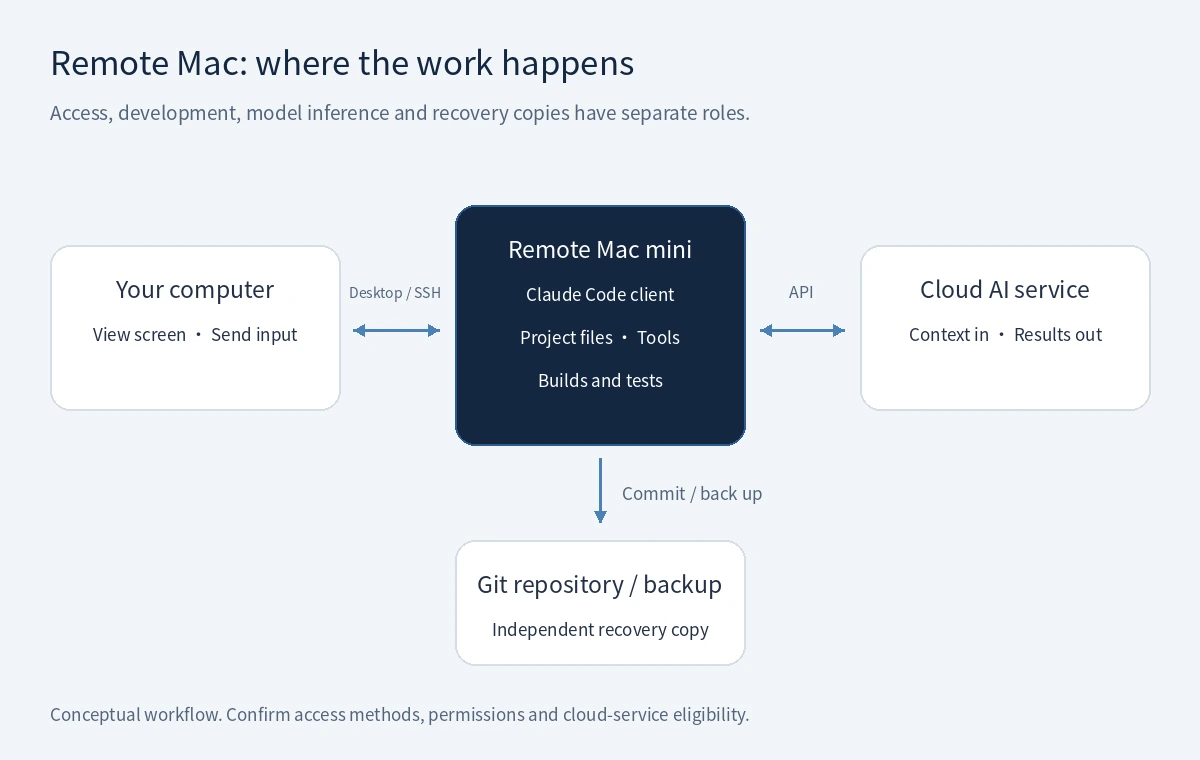
Workflow illustration: the remote Mac hosts projects and tools; the cloud handles model requests, with work backed up separately.
Pick the right access method
Use a remote desktop when you need the macOS interface, a browser preview or a visual editor. If your work is mostly Git, logs and command-line tools, an SSH connection can be a practical alternative when configured for your machine. Decide where the authoritative working copy lives; editing one copy on your laptop while running tests against another on the Mac makes troubleshooting harder.
For a first evaluation, keep the editor, terminal and preview together on the remote Mac. Once that workflow is clear, introduce other clients only when they solve a specific problem.
Prepare a reproducible project
- Check access and ownership. Use an eligible personal account or your organization's authorized access. Check Anthropic's Supported Regions Policy for users and entities: hardware in South Korea does not itself make a user elsewhere eligible. Follow the relevant account terms; the consumer terms prohibit sharing personal account credentials.
- Establish a baseline. Clone an authorized repository, record the required runtime and package-manager versions, and run the normal build or tests before asking the assistant to change anything.
- Write down the working rules. Put setup instructions, test commands and review expectations in project documentation. A
CLAUDE.mdfile can carry the instructions intended for Claude Code. Keep credentials and private customer records out of these notes. - Separate access. Use individual credentials and only the repository permissions needed for the task. Agree who may install software, restart the machine and approve external changes.
Complete one bounded task
Choose something you can verify: fix a reproducible bug, add a small test or update one component. Create a branch and describe the expected behavior, the relevant files and the checks that define success. Ask for an explanation of the proposed approach before a broad change.
Review tool permissions deliberately. Keep deployment, publishing and changes to shared services as explicit decisions. After the edit, inspect the diff and run the appropriate checks yourself or inspect their actual results. A confident completion message is not evidence that your application's behavior is correct.
Commit the reviewed change, push it to your normal repository and leave a short handover note. That makes the remote machine useful as a repeatable workspace rather than the only location containing unfinished work.
Measure the whole session
Run the evaluation from the place and network where you normally work. Check text entry, scrolling, screen clarity, copying small snippets and reconnecting after a disconnect. Then measure dependency installation, your normal build and one representative Claude Code task. Record which part was slow instead of attributing every delay to the remote connection.
Repeat the important checks during your normal working hours. The remote Mac latency checklist gives a fuller framework for separating connection quality from application performance.
Plan for reconnection and recovery
Disconnecting a viewer, logging out of macOS and restarting the host are different actions. Test what happens to your chosen tools in each case before relying on unattended work. Keep useful logs and synchronize reviewed changes; a remote desktop session is not a backup strategy.
Hardware KVM and remote power control provide another route to investigate a machine when normal remote access is unavailable. Ask how you access those controls and what the recovery process permits. Prefer an orderly restart when possible, and keep an independent backup of work you cannot recreate.
Choose a workspace that fits
VPCKR offers dedicated physical Mac mini machines in Seoul with full macOS, hardware KVM, remote power control and Chinese-language consultation. For broader selection criteria, read the Korea Mac mini rental guide.
When requesting a quote, describe your toolchain, typical workload, required storage and preferred access method. Ask about the currently available configuration and the scope of service. Visit VPCKR's dedicated Mac mini service to discuss the host for your workflow; verify third-party account eligibility and subscription arrangements separately.